Welcome to Laser Pointer Forums - discuss green laser pointers, blue laser pointers, and all types of lasers

How to Register on LPF | LPF Donations

Mystery Pictures Thread!

Things

0
Joined
May 1, 2007
Messages
7,517
Points
0
They have one of these over on 4hv.org, and I thought it would be cool if there was one over here too.

Essentially, you can post 1 or a few pictures at a time, and other members try and guess how it was created or what is being shown in the photo.

A few general, common sense rules apply. This thread is for pictures taken by YOU, for things related to technology. Lasers, flashlights, weather etc. I would start off, but I don't have my camera memory card here ATM.



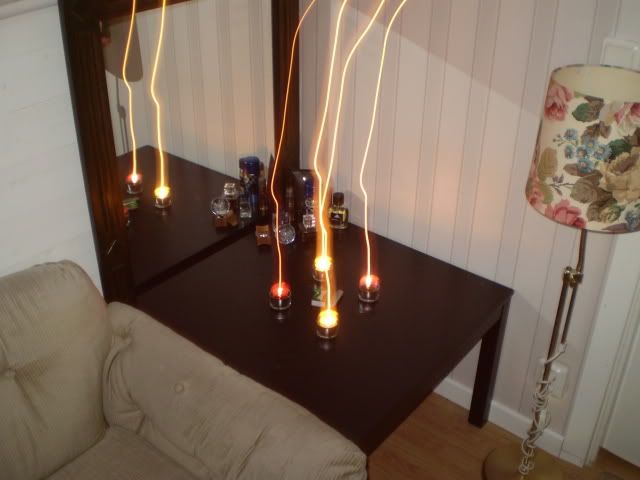
Ok I start, how did this happen? I dun know what I did.

1337121.jpg

C'mon candles are high-tech...
 
mmm. Did you take a long exposure and move the camera, then take another, good picture of the candles and overlap them somehow?

Cool looking tho :D
 
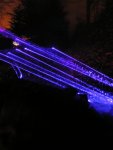
Well obviously it's of my blu-ray laser. But how did I take it? (Okay it's not really quite a mystery, I've just never seen the effect intentionally duplicated before.)

-Mark
 

Attachments

  • PICT0007_001.JPG
    PICT0007_001.JPG
    747.1 KB · Views: 99
FireMyLaser said:
Ok I start, how did this happen? I dun know what I did.

1337121.jpg

C'mon candles are high-tech...

I'll have to guess: What if when powered up a flash goes upwards and that's what the camera got?
 
FireMyLaser said:
Ok I start, how did this happen? I dun know what I did.

1337121.jpg

C'mon candles are high-tech...

Long exposure shot while you placed the candles downward by hand on the table. :-/

OR

The candles are possesed and they tried to kill you with their fiery tentacles, and the only way to defeat them was obviously a camera flash. :D
 
I really don't know how this happened. I think it was some sort of long exposure-setting and I must have moved the camera, then the flash followed?
 
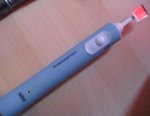
Guess what this is :b
 

Attachments

  • IMG_0987_001.JPG
    IMG_0987_001.JPG
    46.3 KB · Views: 93
I have 2 similar items sat on my workbench.... I just need the time to do something with them, do you get a line or squiggles when you point a laser at the mirror?

Regards rog8811
 
rog8811 said:
I have 2 similar items sat on my workbench.... I just need the time to do something with them, do you get a line or squiggles when you point a laser at the mirror?

Regards rog8811
It works like a standard Galvanometer so it makes a line and liquid sky. It looks awesome when two are combined! This guy also doubles as my electric toothbrush ;) When I feel like playing around I just attach a tiny piece of mirror with 2 double stick photo-spilts instead of the brush head. A <5 cent ½ minute DIY with great results! I Have also tried having the mirror loosely attached so it just vibrates.. makes a funny random light show :D
 
It works like a standard Galvanometer so it makes a line and liquid sky

Can you adjust the line by puting a pot in between the battery and the motor?

Regards rog8811
 
rog8811 said:
Can you adjust the line by puting a pot in between the battery and the motor?

Regards rog8811

I have successfully done this with my other tooth brush mod, but the one in the picture is used for its original function every day. The finish on it is pretty tight so if I try to open it to reach the motor I might be getting bits of plastic in my mouth every time I brush my teeth from then on.. so I won't try :D
I am working on another picture for this thread.. I hope it works out as I planned!

Seb
 
[quote author=FireMyLaser link=1237807508/0#1 date=1237841656]Ok I start, how did this happen? I dun know what I did.

It looks to me that you've got a long(ish) exposure AND the flash is activated. Some cameras have a setting for 1st Curtain and 2nd Curtain flash options. With 1st Curtain, the flash goes off when the shutter is opened; with 2nd Curtain, the flash goes off just before the shutter closes. These settings can be used to deliberately create just the effects you see here to add a sense of movement although without knowing what camera you have it would be difficult to suggest a reliable way to achieve this. If you find 1st and 2nd Curtain settings, they are quite effective in clubs etc, as you get the flashing lights, (and hopefully lasers!), trailing whilst getting crisp shots of faces.

Happy accidents are always a good thing in photography!

(Check out the pic on my profile. It took 20 light bulbs till I hit one right! ;D)

M :)
 
Morgan said:
It looks to me that you've got a long(ish) exposure AND the flash is activated. Some cameras have a setting for 1st Curtain and 2nd Curtain flash options. With 1st Curtain, the flash goes off when the shutter is opened; with 2nd Curtain, the flash goes off just before the shutter closes. These settings can be used to deliberately create just the effects you see here to add a sense of movement although without knowing what camera you have it would be difficult to suggest a reliable way to achieve this. If you find 1st and 2nd Curtain settings, they are quite effective in clubs etc, as you get the flashing lights, (and hopefully lasers!), trailing whilst getting crisp shots of faces.

Happy accidents are always a good thing in photography!

(Check out the pic on my profile. It took 20 light bulbs till I hit one right! ;D)

M :)
Wow :o First of all a good explanation of the picture, second of all.. your profile picture is AMAZING! If I PM you my e-mail do you think you could send me the full picture of that? :D

Seb


Back
Top